Skip to content

Product

One system of record, shaped by who is holding it.

Forged Med is a full clinical, operational, and financial surface for a small practice. Every screen is filtered by the permissions of the person in front of it, so nobody navigates around a feature they were never meant to reach.

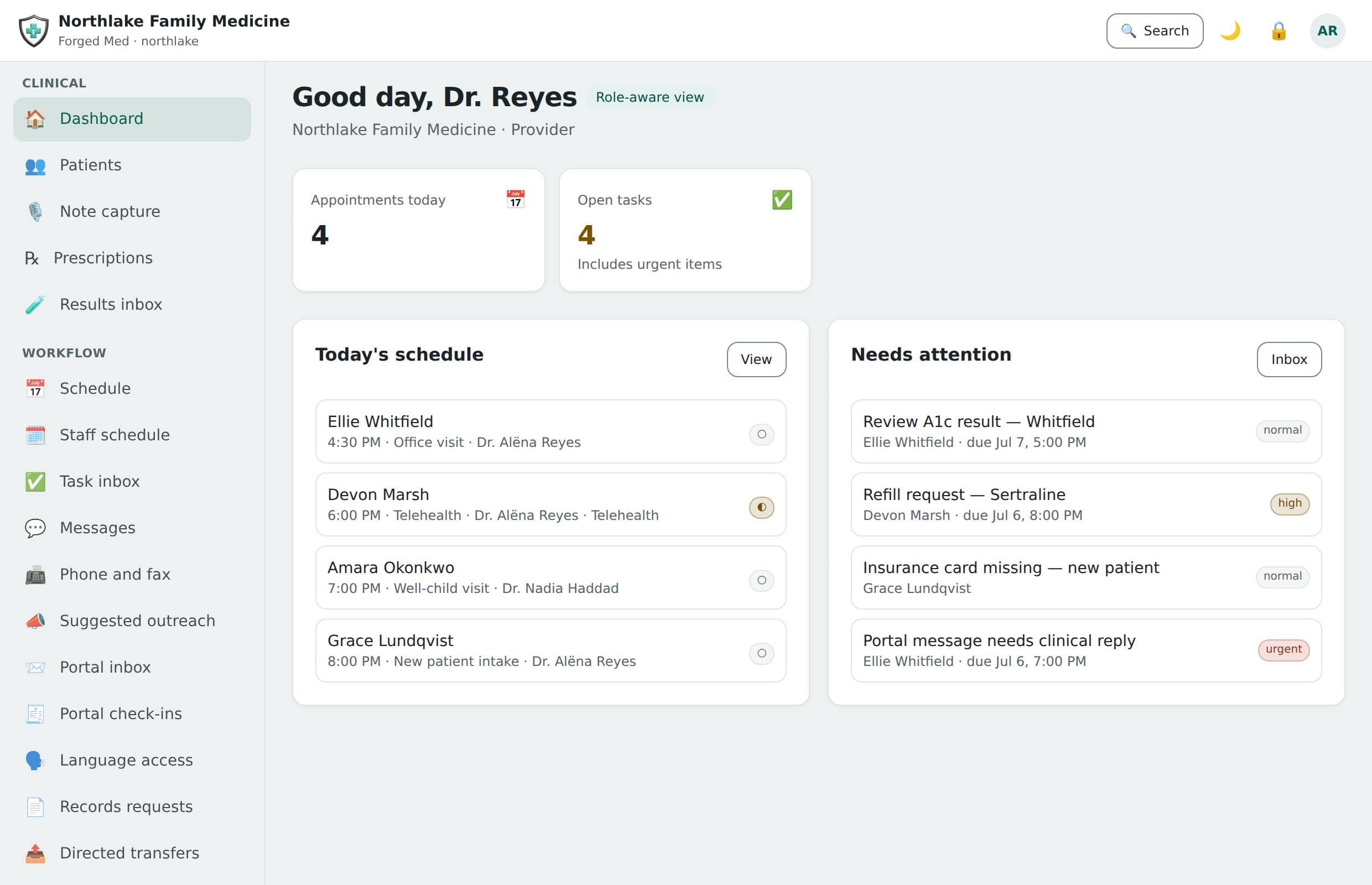
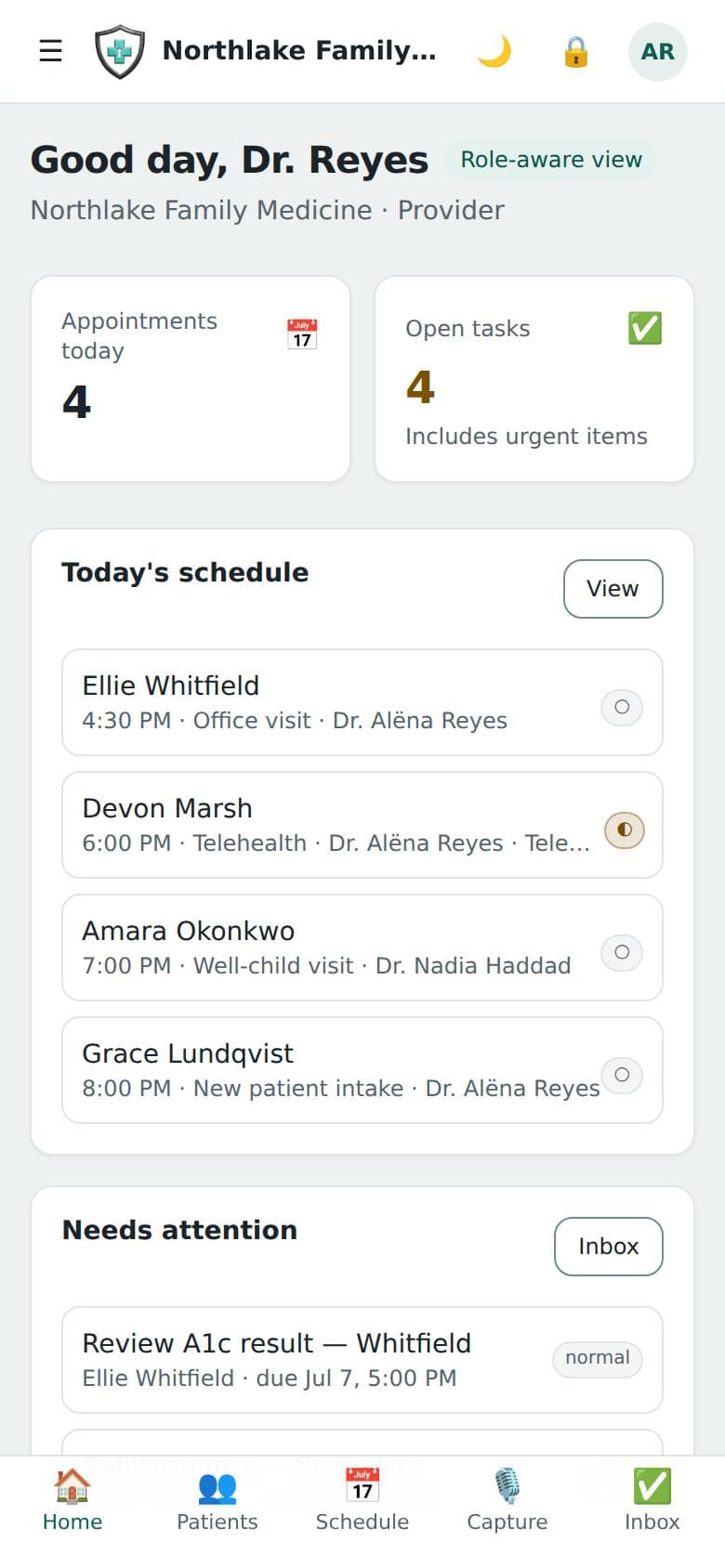
Today — The view each role opens on: today’s schedule, the tasks that need attention, and — for the desk — the intake submissions waiting to be filed.

The view each role opens on: today’s schedule, the tasks that need attention, and — for the desk — the intake submissions waiting to be filed.

A day in the practice

What the software actually does between 7am and 5pm.

The left column is the workflow. The right column is the control that was enforced while it happened — which nobody in the practice had to think about.

  1. 7:40Front office

    Opens the schedule, checks in three arrivals, and files the intake submission waiting for the fourth to the chart.

    Sees appointment and contact fields only — minimum-necessary scoping, not a hidden tab.

  2. 9:15Provider

    Writes the visit note on the encounter between rooms.

    The note stays a draft until it is signed. A draft from a transcript is marked AI-authored — and no speech-to-text service is bound, so a visit is not yet recorded or transcribed.

  3. 9:22Provider

    Reviews the draft, edits two lines, signs.

    Signing is a state transition, and it emits an audit event naming the signer.

  4. 11:00Provider

    Works the results inbox: signs off the normal results in one pass and opens the two abnormal labs one at a time.

    “Mark all reviewed” never signs an abnormal result, and each sign-off records who, when and a hash of what they saw.

  5. 16:30Billing admin

    Posts two payments against open statements, accepts the code on a charge, and checks the good-faith estimate owed before tomorrow’s self-pay visit.

    Financial-scoped role: coverage, invoices, claims, and payments — never the clinical note.

  6. 17:05Practice owner

    Opens the audit explorer and sees every one of the above, in order, with correlation ids.

    Append-only and hash-chained — the log cannot be quietly rewritten.

All 21 modules

Everything a practice runs on, and nothing it does not.

The complete inventory, module by module and feature by feature. Nothing on this page is a roadmap item — if it is listed, it is built, tested, and running. What is deliberately not claimed is at the bottom of the page rather than left out of it.

Clinical record

The system of record for care, where a signed note is fixed by a passkey signature over its exact text and a correction is a new note that names it.

  • Patients, problems, medications, allergies — each resolved, re-statused or corrected afterwards with a reason and never deleted, a nurse or MA amending problems and allergies but not medications — and the patient record itself: demographics, contact details, the people to call, and how the practice would reach them under the patient’s consent. A chart can be pinned for quick return, and a prescription started from it
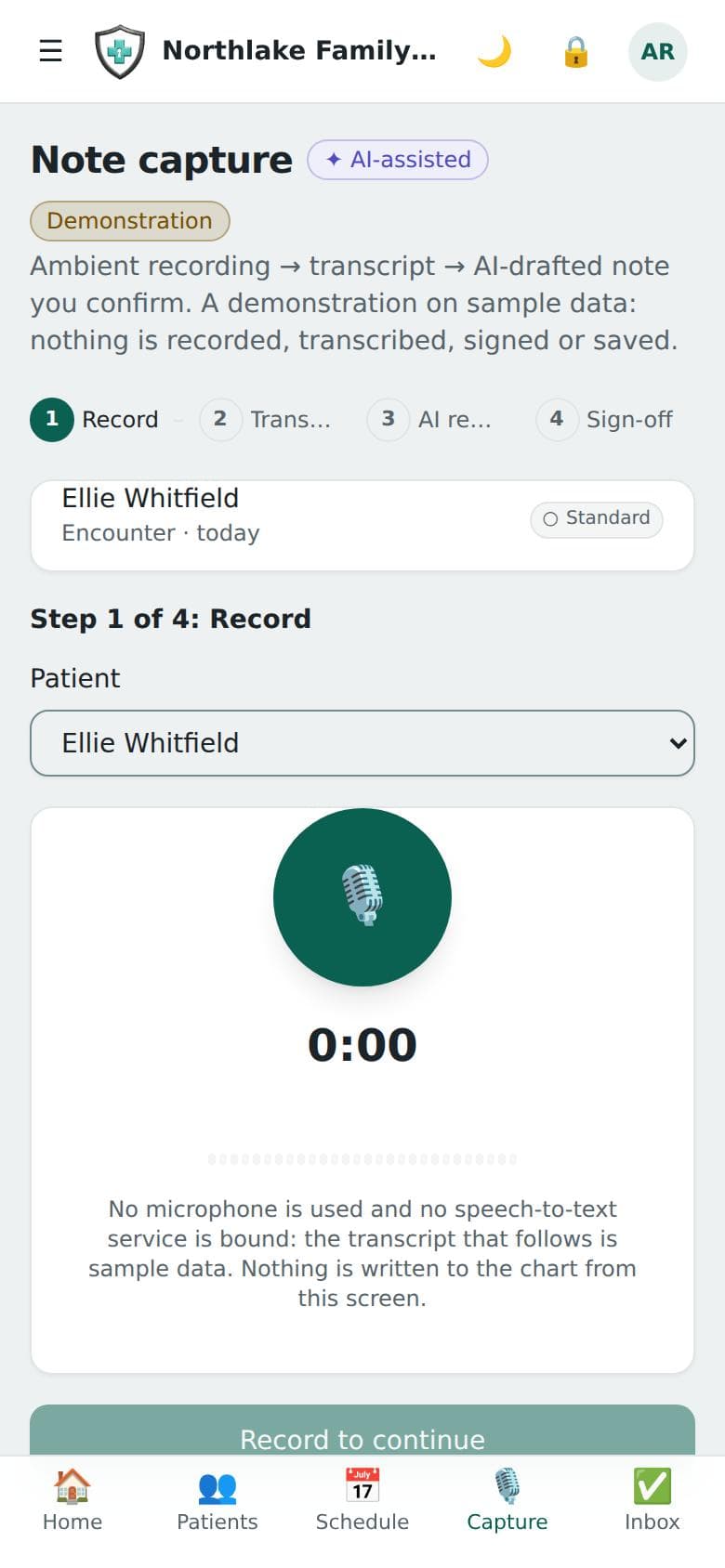
  • Encounters, and the visit note written as one text on the encounter and signed with a passkey — a dictation walkthrough exists on sample data only, and nothing transcribes a visit
  • Observations and vital signs, immunizations and procedures shown and recorded on the chart — the clinical middle most systems skip — with a correction that names the entry it replaces, never an edit in place. They hold what the practice entered: no laboratory, imaging or immunization-registry connection supplies them. Insurance coverage is held in the record and served by the API
  • The care team on the chart, not in a billing silo
  • Race and ethnicity coded to the OMB minimum categories with their CDC codes — “declined to answer” recorded as an answer — beside the patient’s own words, and preferred language as a validated BCP 47 tag
  • A results inbox that a clinician signs off: scored screeners, laboratory and imaging observations, and results filed to the chart, for their own patients, worst first — each signature recording who, when, a comment and a hash of what they saw. “Mark all reviewed” signs only the normal, final ones; nothing abnormal, positive or unopened is ever signed in bulk
  • A chart exported as a file — FHIR R4 JSON or a readable PDF — record by record by its own export tag, with a second person’s single-use approval where a record asks for it, the disclosure entered in the accounting, and a download only the requester can make, for three days
  • Care plans and goals on the chart — created, opened and edited there
  • Clinical documents uploaded to, listed on and downloaded from the chart — a download says what is known about the file, and “not scanned” where no scanner is connected; an upload needs the deployment’s document store. Intake submissions filed to the chart: demographics and scored screeners are written, and what the patient reported about allergies, medications and problems is listed for a clinician to enter, never written for them
  • An RxNorm drug-naming adapter over NLM’s public RxNav — medication entry does not call it yet, so medications are stored as typed; naming only, never interaction or dosing checking
  • Validated screeners — PHQ-9, PHQ-2, GAD-7, AUDIT-C — scored at the published cut-points and carrying their LOINC codes
  • PHQ-9 item 9 escalates on any non-zero answer, independent of the total score
  • An unfinished screener is filed as unfinished, never as a low score that reads like a well patient

Prescribing and controlled substances

E-prescribing with the DEA’s EPCS controls built in rather than bolted on, and a signature over the prescription itself.

  • Prescription lifecycle: write, sign, transmit, void — four distinct permissions
  • EPCS two-person logical access control before a prescriber can sign
  • DEA registration tracking and renewal, with expiry flagged sixty days out
  • PDMP attestation recorded against the prescription
  • The screening record and its override rules, with a screening dialog on each unsigned prescription — a knowledge base is a deployment’s to license, and until one is connected screening answers “not configured” rather than “nothing found”, so there is no finding to override. The federal schedule rules the platform enforces are shown beside the list
  • The EPCS audit trail, a daily incident report run each day for the day before, and a monthly log each prescriber can open — it is available to them, not sent

Practice operations

The day-to-day layer that keeps a small clinic moving without a practice-management bolt-on.

  • The schedule by day or by week, for one provider or all of them, with booking and every move a visit makes: confirm, check in, complete, no-show, cancel, or move to another time
  • Task inbox — create a task, start it, complete it, rename, reassign or defer it, and filter by status, priority, who it is for and which patient it is about
  • The intake studio — the catalog of questions and validated screeners, scoring without saving anything, practice forms, and recording a submission a person took down — then submissions, whether a patient filled them in on the portal or staff took them down, filed to the chart, with a row whose answers raise an urgent finding marked before it is opened; and secure messaging, started with a subject and the colleagues in it and widened afterwards
  • One patient’s calls, faxes, texts and emails, and portal conversations in a single list, with a call, a templated text or email and a fax started from it — through the same consent rules, and said plainly as not placed or not sent where no carrier or provider is connected
  • Coverage and delegation — who is covering for whom, and what that grants — granted and ended on Practice settings, with a reason required to end one early
  • Staff scheduling per site: the weekly rota, a coverage check against each site’s target, and time-off requests nobody approves for themselves — approving leave lists the booked appointments it overlaps for a person to rebook; it messages no patient and does not block new bookings
  • Prior authorization tracking: every request, payer, answer and day outstanding — submitted to the payer by the practice, not by the platform; recorded and tracked on the Coverage and prior authorization screen, with each request’s history and the document references listed against it (nothing is sent)
  • Downtime read-only access: the day’s schedule with allergies, medications, problems and latest vitals, saved from the Schedule screen as a signed file the practice can open and print when the platform is unreachable — no offline signature checker ships
  • Denied-access telemetry — what people tried to reach and could not, grouped so one person hitting the same wall stands out — on Practice settings, for whoever may read the audit trail
  • Sites and departments — locations with their time zone, facility NPI and CLIA number and the staff assigned to each, and service lines whose sensitivity decides who outside them can read their records — added, changed and staffed from the Locations and Practice settings screens; opening hours are not stored
  • A list of the downtime packs already made and how old the practice’s copy is, on Practice settings

Charges, invoices, and payments

One coded charge ledger that serves cash-pay and insurance alike — invoices, payments, and statements off the same source of truth.

  • Coded charges (CPT, HCPCS, ICD-10) from day one, whether or not a payer sees them
  • Invoices, payments and statements, with a ledger of the payments and refunds posted against each statement’s balance
  • Card payments through Stripe’s own hosted card fields, on the billing office’s Payments screen and in the patient portal — off unless the deployment connects Stripe and the practice switches it on; the platform receives only Stripe’s token, never a card number, and sends Stripe nothing that identifies the patient
  • Stripe’s signed webhook received and verified: a payment confirmed after the bank’s 3-D Secure challenge posts once, a failed or cancelled one is marked failed, and a refund reinstates what is owed
  • Revenue figures and A/R aging (0-30 to 120+ days, patient and payer responsibility, per payer) computed from the ledger on every read, each figure with its definition
  • A Billing Suite a practice switches on: payment plans over its statements with instalments tracked from posted payments, and a collections worklist with owners, status and notes
  • Eligibility recorded before the visit, with an X12 library that builds the 270 inquiry and parses the 271 response — not yet called by the API, and no payer connected to send them to. Insurance on file shows the latest stored result for each coverage, as not checked, entered by hand, or (only from a connection that is bound) from the payer
  • Financial-scoped roles that never touch the clinical note

Claims and remittance

Claims out and remittance back, with the three invariants that hold no matter how a practice configures it.

  • ASC X12N 837P professional claims generated from the encounter
  • A scrubber that reports every problem at once, not the first one
  • A claims screen to build a claim from an encounter, check it, record the filing with its exact 837 and follow its timeline — nothing is transmitted without a clearinghouse — plus corrections and voids: a claim is edited until it is filed, and a correction is a new claim referencing the original
  • 835 remittance parsed and posted from a pasted or loaded file, with CARC/RARC translated into plain language
  • 999 and 277CA acknowledgements parsed and applied, by hand from a pasted or loaded file or from an adapter — and never dragging a claim backwards past a state it already reached
  • A denial worklist ordered by recoverable money, with denials grouped by cause
  • The claim bytes are attested to the ledger before transmission, so what was sent is provable
  • No Surprises Act good-faith estimates for uninsured and self-pay patients: the deadline opens when the visit is booked, the estimate is priced from the self-pay fee schedule and given through the portal or on paper, and a bill $400 or more over it is flagged

Billing automation

Work removed from the billing specialist without the decision being removed with it.

  • Three tiers: automatic, proposed, and forbidden — served as data the platform computes from the practice’s settings, not described in release notes
  • Four ceilings no configuration reaches, because each is where a bad claim becomes a false one
  • Denial patterns learned from the practice’s own posted remittances — deterministic, no model involved
  • A warning before submission when this payer has sent this claim shape back before
  • Corrected claims assembled and waiting, appeal letters drafted, and the policy and switches on a screen; nothing is ever filed or sent without somebody doing it
  • Appeal letters drafted for a person to send, never into the post — on the Billing automation screen, and only once a model is bound

AI, governed

Copilot, transcript-to-note, coding, classification, and agents — each one routed, risk-tiered, minimised, and logged.

  • Machine transcripts that stay unreviewed and unusable in a note until a named person accepts or rejects them, on the AI governance Transcripts tab — empty today, because no speech-to-text service is bound and nothing is transcribed
  • Transcript-to-note drafting that cannot enter the record unsigned — on the encounter, from text a clinician pastes in, shown as a suggestion with where it came from; nothing transcribes audio, and the capture screen is a walkthrough on sample data
  • A coding assistant that must quote the note text supporting every code it proposes
  • Citations that cannot be found in the note are dropped, not shown
  • What the model sees is minimised before it sees it
  • Data classification proposed by a model from a closed list of labels, and confirmed by a person
  • Scoped agents with explicit manifests, each of which can be switched off on its own, and run from the catalog as a dry run or as a draft that needs a colleague’s approval
  • A prompt library for each role, with a queue where anybody can ask for a prompt the library lacks and whoever configures AI reviews what was asked
  • One governed gateway with PHI and BAA gating that every model call goes through
  • AWS Bedrock is bindable as a real provider, off by default, under the deployment’s own account and BAA — not yet exercised against live Bedrock

AI accountability

The part most vendors skip: recording what the model suggested against what the human actually kept.

  • Suggested-versus-kept hashed into the transparency log for every accepted coding suggestion; note drafts record what the model suggested
  • A scored coding-accuracy evaluation set that fails a release on over-coding or fabrication
  • A run that was never measured reports “not measured” and never passes
  • An AI effectiveness report — what models have actually been doing, including how much of their output was discarded, with the report’s own warning when a sample is too small to mean anything — on Practice settings
  • AI usage by feature and model — calls, refusals and tokens, and cost only from the prices a deployment configures
  • A log of every AI run — who asked, which model, the BAA check — that keeps no prompt and no answer
  • Evaluation suites run against the practice’s own model, refused rather than scored when none is connected
  • Per-patient autonomy, so one patient’s record can be off-limits to a model entirely — enforced on every AI path that reads a chart, and set on Practice settings; only the no-AI value changes what the platform does

Identity and access

Federated sign-in, passkeys as the second factor, and a role that starts with nothing.

  • Federated OIDC sign-in, per practice
  • WebAuthn passkey enrolment, and step-up as a policy obligation rather than a screen
  • Per-practice session rules — idle sign-out, how long a step-up lasts, and the longest a session can be renewed — that can be made stricter than the platform’s and are refused if they would be looser
  • Fourteen roles, each starting at zero permissions and granted through job templates
  • Practice job templates that combine existing roles — never a new permission, never the owner or a platform role, never a separated duty rejoined
  • Staff administration on screen: invite a person, change their built-in roles, suspend or restore an account, and decide the queue of access requests — each grant behind a step-up, held to a ceiling (nobody gives access they do not hold), with the practice’s last owner protected and making an owner a two-person act
  • Roles of your own, built one function at a time from a checklist: the owner and the security administrator make them, a change applies on the person’s next request, nobody can add a function they do not hold, and signing, controlled-substance authority and changing who holds access cannot be put in one
  • See every session you have open and end the ones you do not recognise; your security officer can end a colleague’s
  • Separations that exist on purpose: writing a note is not signing it, assembling a claim is not filing it
  • Break-glass access that nobody approves for themselves
  • Support access with a scope, a reason, an expiry, and a record — Forged Med staff hold none by default

Zero-trust authorization

Deny by default, enforced before a handler runs, and replayable months later.

  • Tenant, RBAC, and ABAC checks all pass — or the request never reaches a handler
  • A route that declares no permission is denied, not allowed
  • Obligations enforced by an interceptor, not trusted to the handler
  • Minimum-necessary scoping shapes the response body, not just the endpoint
  • Every decision journalled with its verbatim inputs and a fingerprint of the rule set
  • Decision replay: “why was this denied on the 14th” is re-run, not reconstructed by argument
  • Clinical department segregation: a service line carries a sensitivity, and a behavioural health record is not opened by seniority
  • 42 CFR Part 2 records refuse everyone but a member unless the practice raised break-glass — a vendor support grant does not open one
  • Lists are narrowed rather than refused, and the departments withheld from a page are audited once for the page
  • Chart access by role or by care team — the practice chooses. In care-team mode a chart outside your care takes break-glass; in role mode those reads are recorded and a run of them is a detection

The transparency ledger

An append-only Merkle log with signed checkpoints sent to the witnesses a practice configures — none is configured by default, and until one is, a checkpoint is stored here only and the security console says so. A witness is the point: a log only its owner can check is a log its owner can rewrite.

  • RFC 6962 Merkle tree with Ed25519-signed checkpoints
  • Every consequential act signed into it — sign-offs, prescriptions, claims, exports
  • Checkpoints published outward to witnesses the practice configures, which cosign them — what makes a split view detectable. No witness is configured by default, and a log nobody is countersigning is reported as such
  • Inclusion and consistency proofs on demand, on the Record integrity tab — and the console says first whether any independent witness is countersigning
  • A record integrity report a practice can hand to an auditor, for the whole practice or one patient, generated and downloaded from the Record integrity tab
  • Turning off a checkpoint destination takes two people: one proposes, a second approves with their own passkey
  • A runnable reference witness ships with the platform

Patient receipts

A patient can be handed cryptographic proof that their own record’s history has not been rewritten.

  • A per-patient inclusion proof against the published log — issued, and a returned one checked, on the Record integrity tab; with no witness configured it says so beside the receipt
  • Verifiable against the verification key the receipt itself carries, with no privileged access to the platform — the key is not served on any public route
  • The receipt proves history, and deliberately carries no clinical content

What your vendor can and cannot do

Forged Med support holds no standing access to your practice, and every minute it holds temporary access is visible to you and endable by you without asking.

  • No standing access: a representative holds nothing until you approve a scoped, expiring session
  • Patient data is a separate approval, capped shorter, and never part of a default request
  • Support sees your patients under a code, not by name — in the structured record and inside your clinical notes, where identifiers are stripped out of the prose too
  • Identifying one patient needs a typed acknowledgement, a stated reason, five minutes, and a line on your own audit trail
  • Every support session cites a ticket, and the ticket is checked against our own ticketing system before you are asked to approve anything
  • Support can be shown what one of your people sees — read-only, minutes long, and only on a session you already approved
  • Making a change on your behalf needs your approval AND a second Forged Med approver
  • Signing a note, prescribing, approving a two-person ceremony, exporting, and changing roles are refused to a support session no matter what
  • A banner on every page while somebody from Forged Med is inside — shown to the person whose account is borrowed and to your administrators, who get a button that ends it, no reason required
  • Every support request waits in your security console for you to approve or refuse, and every session shows there with what it was approved for and an End button; every action taken inside one is in your audit trail, tagged with that session
  • The audit trail always names the Forged Med representative as the actor, never your staff member
  • Forged Med’s own conduct is monitored by rules your practice can read, reviewed by people who are not the support team
  • You can restrict which countries our support may reach you from — enforced on every request, recorded on every action, and readable from your own console
  • Your Support access screen shows every visit act by act — including the requests that were refused — every patient identified to us (by id and code, never by name) with an End now while we can still see the name, and the choices you make about who may ask and who is told
  • That location is established by a connection our servers cryptographically verify came from our own edge, not by a header anybody could send
  • Your audit trail is append-only in the database itself, and you can check that from your own console rather than taking our word for it
  • Your own activity, broken down by role — dormant accounts, refusal rates, after-hours work — from the same code we read it with, on the Activity & decisions tab of your security console, along with the decisions journal and its replay
  • A support request that reaches us by email cannot open a chart until you confirm it, and once you have set notification addresses they are told one is waiting — a count, never its words
  • Our ticketing system’s own tamper-evident log is read entry by entry by the reviewer who oversees support, not by the representatives it records

Audit and security intelligence

The evidence layer: a durable hash-chained event stream feeding detections and a live posture score.

  • Append-only, hash-chained audit, with one correlation id across everything a request did
  • Audit emission is non-optional for AI actions, break-glass, exports, and privilege changes
  • Every sign-in failure audited by name, so “wrong password” and “unknown practice” are different events
  • Seven detection rules fed by the platform’s own audit trail: after-hours access judged on the practice’s clock, bulk-access spikes, charts opened outside the care team, export-volume anomalies, privilege creep, repeated authorization denials, and break-glass without review
  • Posture scoring that says, control by control, whether it was measured, configured or merely asserted
  • Findings acknowledged, assigned and closed with a written reason, with a history an auditor reads and cannot change
  • Automated-response playbooks that can be defined and retired on their own screen as stored definitions — no automated-response platform is connected, so nothing is dispatched and the screen says so; anything destructive would wait for a different person’s approval
  • Break-glass reviewed after the fact by someone other than the person who used it — and the detection clears only on that review
  • A key inventory that says where each key rotates; third-party application secrets rotate in-app with an overlap window
  • Findings forwarded to the practice’s own SOC as OCSF or ECS, with the control credited only once a batch has actually been delivered
  • Malware verdicts for stored documents, read from a verdict service or from GuardDuty’s own scan of the bucket
  • Tenant isolation enforced twice — application scoping plus PostgreSQL row-level security

Compliance and governance

Retention, consent, and regulatory posture enforced rather than merely classified.

  • Patient consent directives under HIPAA §164.522(a), enforced as a policy directive rather than a flag somebody remembers to check — recorded on the patient’s chart, where ending or rewriting a protection in force asks for a fresh sign-in and a reason
  • The self-pay restriction (§164.522(a)(1)(vi)) scoped to the visit or codes the patient paid for: those lines are left off the claim, a claim still carrying one fails scrubbing, and the patient can still be sent a statement
  • Confidential communications (§164.522(b)) — an alternate number, email or address, "not the home number", "no voicemail" — honoured by every call, statement and portal invitation, and requestable from the portal
  • 42 CFR Part 2 for substance-use records: element-level labels down to the clinical note, §2.31 consents the patient signs and withdraws in the portal, and the §§2.51–2.67 exceptions recorded with who determined each — the platform documents the judgement and does not make it. Staff record labels, consents and exceptions on the patient’s chart, and removing a label or recording an exception asks for a fresh sign-in; the section element lists need counsel’s review
  • Retention sweeps that never delete the clinical record — not at seven years, not at any age
  • Every sweep report names the categories it did not touch
  • Per-practice regulatory posture, versioned, with state-aware PDMP and prior-auth rules
  • A conformance registry recording what is claimed and what is not
  • Obligations on a calendar, with a two-person ceremony where one is required
  • A compliance office for breach incidents: the notices owed worked out from the facts recorded, each as days left or overdue, the four-factor assessment before any “not a breach”, law-enforcement delay, the annual log for HHS, and the patients who have not acknowledged the current notice. The practice sends every notice; the platform records that it did
  • Authorizations under HIPAA §164.508 that a defective form cannot save, and disclosures made outside the platform recorded into the patient’s accounting after a fresh sign-in
  • Two-person approvals on screen: propose, reject or withdraw, and approve with the second person’s own passkey over the exact terms
  • A Section 1557 nondiscrimination notice on the practice’s sign-in pages and portal, with patient requests for interpreters and accessibility aids tracked to an outcome. The practice supplies its own taglines — the platform ships no translations

The patient portal

The same record, seen by the person it is about, and a copy of it they can keep.

  • The practice’s intake form, answered by the patient at home — its questions and the validated screeners — arriving as a submission that waits for the front desk to file it, exactly like one a member of staff took down. It writes nothing to the chart: what the patient says about allergies, medications and problems is listed for a clinician to enter and is never entered for them, the patient is shown no score, and an answer that suggests they need help sooner than the visit shows them 911 and 988 at once and marks the row for staff
  • Nine resource types read by the patient themselves — demographics, visits, problems, observations, allergies, medications, immunizations, procedures and coverage. Clinical documents are not among them: the portal says which types it serves rather than showing an empty tab
  • A §164.528 accounting of disclosures written by each disclosure path — directed transfers, faxes, bulk exports, chart exports — at the moment it happens, with disclosures made off-platform recorded by the practice’s privacy officer, and handed to a patient who asks at the desk as a PDF. One the practice makes on paper and never records is not in it
  • The Notice of Privacy Practices in force, public before sign-in and in the portal, with an acknowledgement recorded against the version that was current when it was given, from a worklist of the patients who have not yet acknowledged it
  • Identity verified by the practice before the account exists — an account handed out on an email address alone is one somebody else can take
  • Encrypted directed transfer to a verified recipient, so “send my records to my new doctor” is a control rather than an attachment — the patient authorises it in the portal, and the practice verifies destinations and approves each transfer before anything is sent
  • Message permissions the patient sets themselves, by channel and purpose, each change a new row in a ledger — and a page that tells the patient how their record is protected using only what the practice’s own records show: the transparency log, the accounting of disclosures, their consents and who acts for them
  • Records requests the patient can follow — deadline, fee, a denial whole or in part, and a review by a clinician who took no part in the denial
  • The patient sees who can act for them and can end a proxy; a representative who is not a patient here gets an account that reaches only the record they were granted
  • A patient downloads their own copy — the whole portal record as a readable PDF or a FHIR file, at once and at no charge, with the privacy warning inside it. A limited proxy cannot; notes, images and billing records still come through a records request
  • Check in from the portal inside the practice’s window, cancel before its notice period, and ask to move a visit — a request the front desk answers with a new time or a note, because there is no published-slot calendar to book into
  • Secure messages to the care team, routed to the inbox that answers them, with read receipts both ways — text only, never emailed or texted, and crisis language answered with 988 and 911 at once because the inbox is not watched in real time
  • A patient reports a problem with the portal, their account, a bill, their record or their care — it goes to the practice’s own inbox, where staff answer and close it and the patient sees its status, and never to Forged Technology’s support desk
  • Reminders worked out from the record when the patient looks — upcoming visits, answers to a request to move one, unread replies, and renewals estimated from the prescription — shown in the portal and sent nowhere

Third-party API access

SMART on FHIR apps and Bulk Data, behind a gate the practice opens deliberately rather than one a vendor opens for them.

  • A SMART authorization server: authorize, token, introspect and revoke, with discovery served at the FHIR base that also says what an app cannot yet do with it
  • EHR launch, from the Applications tab of the Developer and SMART apps screen: a launch value bound to the clinician’s session, single-use and five minutes long, carrying the patient and encounter
  • SMART Backend Services: a signed client assertion against public keys the practice pinned, with a replayed or long-lived assertion refused
  • Per-app approval — registering a client is not the same as letting it in
  • Layered activation: the platform enables the capability, then the practice accepts it in a recorded ceremony
  • The Bulk Data IG’s asynchronous export for an approved backend app — kick-off, polling, a file per resource type fetched with its own token — never wider than its scopes, with every patient in it accounted
  • A staff-requested bulk export of named patients, a Bulk Data group or the practice, written as FHIR resources with no_export records and patients’ own restrictions honoured — never the whole practice by accident
  • One approval starts one export; a second attempt on the same ceremony is refused and recorded
  • A refresh token yields exactly one live grant, decided by a compare-and-set rather than a read
  • A Developer and SMART apps screen: the capability gate with the layer that refuses it in plain words, proposing and recording an acceptance, stopping a capability at once, registering, approving and revoking applications, and the staff bulk export from request to download
  • A consent page an app’s user lands on: what the API validated, the scopes that will and will not be granted, and a single-use code only on the signed-in person’s agreement

Telehealth and ambient capture

A video visit, and the consent, transcript and drafting pipeline an ambient scribe runs on — with no transcription service bound to it yet.

  • Video visits with the room provisioned through a port, not welded to one vendor — the clinician opens the room, ends the visit and runs the scribe’s consent steps (where each person is, the rule that applies, the notice, start, stop, withdraw) from the encounter screen
  • The ambient-capture pipeline: recorded consent, finalised transcript segments, and a draft note produced from them — no speech-to-text service is bound, so nothing is transcribed until a deployment connects one
  • The draft carries its machine origin and joins the record only when a clinician signs it
  • The recording notice is shown, and the fact that it was shown is recorded
  • Withdrawing consent mid-visit ends the capture and the meeting — not a preference somebody reads afterwards
  • Raw audio can be forked to the practice’s own pipeline, so the recording is not only ours
  • A qualified interpreter, spoken or sign language, joins the video visit on a link that admits them to that one room, is recorded on the visit, and is shown to the patient

Phone and fax

The two channels a practice cannot leave behind, built as first-class surfaces rather than afterthoughts.

  • Outbound calling from any device a practitioner happens to be holding
  • Naming the patient instead of a number dials the one already on the record, so nobody retypes a digit off a chart
  • The call says whether a voicemail may be left before the phone rings, and refuses to dial somebody recorded as deceased
  • An inbound fax inbox with an assignment queue
  • A fax nobody has claimed is visible as unclaimed, not filed into a folder that looks empty
  • Misfiling is reversible: reassignment is recorded rather than overwriting the first answer
  • Transmissions reconcile against the carrier instead of being assumed delivered
  • Suggested outreach from the schedule — a reminder before a visit, a nudge after a missed one — checked against recorded consent and approved by a person, then sent in the platform’s fixed wording once a text or email provider is connected
  • Appointment reminders by text or email on rules the practice sets, sent only with a recorded consent and inside the hours the patient’s state allows, from fixed wording that carries no clinical detail
  • A sent log that records what the provider said — accepted is not shown as delivered, and a STOP reply revokes consent on the next check

The compliance programme

Frameworks, controls, evidence and the crosswalk between them — the GRC tool running inside the record system it governs.

  • Frameworks and versions, requirements mapped to canonical controls
  • Control instances with tests, results, and evidence carrying a freshness clock
  • A crosswalk: one control shown to satisfy equivalent requirements across frameworks
  • A library integrity check you can run from the framework library screen: a mapping that points at a requirement or control that does not exist, or a repeated mapping id, fails it, because either would quietly inflate a coverage score; requirements nothing maps to and controls that satisfy nothing are listed without failing it
  • Blast-radius analysis — what stops being satisfied if this control fails
  • Gap prioritisation, so “what do we build next” is answered from the mapping
  • Every mapping that counts toward coverage accepted by a human and carrying a written rationale; the HIPAA Privacy Rule and NIST CSF 2.0 mappings ship as drafts awaiting that review, and count for nothing until accepted
  • A starter pack that seeds your own programme from the shared library, by your choice: which frameworks to put in scope (HIPAA Security ticked by default), which themes of control, and optionally a draft policy for each theme linked to the controls it authorises, a starter risk register linked to the controls that reduce each risk, and a first internal-audit engagement. You preview exactly what it would create, then apply; it only ever adds, so applying twice creates nothing twice and nothing you have written is overwritten. Everything it creates starts not implemented, untested or draft, in the name of whoever applied it, and is held to the owner and the security administrator
  • The compliance console records its work in your programme: test results, evidence, policy approvals, risk acceptances, determinations, findings and remediation, each one on the audit trail under the name of whoever did it
  • Separation of duties held per act, not only per role: nobody approves the policy they wrote, accepts the evidence they collected, tests the control they own, or signs off the remediation they ran
  • A board pack, any register as a spreadsheet, and an evidence package for your assessor — with the accepted files themselves, each checked against the hash recorded when it was uploaded — generated from your records and logged as exports
  • Your own assessment questionnaires and vendor register, written and versioned in the console; an issued questionnaire is never edited under its respondent
  • An advisor that reviews a policy or control against the questions an assessor asks, and — when your platform has a model and your AI policy allows it — asks that model through the same AI gateway as every other feature

Interoperability

A FHIR R4 facade over real records, and governed import and export, so being the system of record is not a trap.

  • Nine FHIR R4 resource types served from real records: Patient, Encounter, Condition, Observation, AllergyIntolerance, MedicationStatement, Immunization, Procedure, Coverage
  • The facade refuses rather than returning an empty resource
  • One patient’s chart exports as a FHIR R4 bundle produced from the same mapper as the facade.
  • Import a FHIR bundle or a C-CDA document into staged candidates — allergies, medications, problems, immunizations, contact details — that a clinician accepts or rejects one by one on the Data exchange screen; nothing reaches the chart without a person, and every section not read is named
  • Export a patient’s record as a FHIR bundle for a named recipient, approved by a second person and entered in the patient’s accounting of disclosures — produced for download from the chart, not delivered
  • A connector framework for outside systems, with no connector bound to it; the Integrations screen lists a practice’s connectors, shows what each is permitted to do and whether a BAA is on file, and connects or disconnects one
  • A Data exchange screen that reads the FHIR facade as an integrator would — capability statement, a patient-scoped search, a read, one patient’s $everything — and asks the connector framework whether a call would be served
  • A CapabilityStatement that states what is not certified

The boundaries

What we do not claim.

A capability list read without its limits is how somebody infers a certification nobody holds. Each of these is asserted inside the product too — in the CapabilityStatement, in an API response, or in the evaluation set's own provenance — not only on this page.

  • A dedicated tier is a separate deployment

    The API connects to one database. A practice on a dedicated database or a dedicated environment is therefore served by its own deployment of the platform, pointed at its own database; one shared deployment does not route each practice to a different database, and moving between tiers means moving the practice’s data into that deployment.

  • Breach notices are recorded, not sent

    The compliance office works out which notices a breach owes and when, and shows each as days left or overdue. The platform sends none of them: marking a notice sent records that the practice sent it, and stops its clock. State notices come from a table of four states (Texas, Colorado, Florida and Washington) marked for counsel’s review; for any other state only the HIPAA clocks apply. The Part 2 section element lists and the §2.32 notice text also need counsel’s review, and the platform documents the judgement that a disclosure without consent is lawful rather than making it.

  • Account administration has gaps the screens do not close

    Staff are invited, re-roled, suspended and restored, and access requests decided, on the Administration screen; sites, departments and who works in them are managed on Locations and Practice settings; a new member of staff asks for an account from the sign-in page; and making someone a practice owner is proposed and approved on the Two-person approvals screen. Still without a screen: taking someone off a site or a site off a department, and a site’s opening hours, which are not stored. The queue of account requests is held in one server’s memory, so it works as described on a single API instance only and is lost on a restart. Registering an AI model is done by Forged Technology, not by a practice.

  • Much of the chart is still written through the API, not on screen

    The chart shows and writes the patient record and contacts, problems, allergies, medications, observations and vital signs, procedures, immunizations, encounters, notes, care plans, the care team and its outside clinicians, documents and tasks; the encounter screen opens, updates and signs the encounter, writes, signs and amends the visit note, and drafts one from a transcript. A problem, allergy or medication is amended on its own tab, with a reason and without deleting it (the prior values are in the audit trail, not shown on the chart). Insurance coverage is entered and read on the Billing screen, not on the chart. The chart’s observations, procedures and immunizations are what the practice recorded — nothing arrives from a laboratory, an imaging centre or a state registry, because none is connected. Until a screen exists for the rest, a practice needs somebody who can call the API for that part of the record.

  • A patient’s intake form is sent whole, and is never entered on the chart for them

    A patient answers the practice’s active intake form in the portal and sends it once; it waits for the front desk to file, and a patient cannot save half of it and return to it (to change an answer after sending they write to the practice). Filing writes the demographics and the scored screeners; what the patient reported about allergies, medications and problems is listed for a clinician to enter on the chart and is never written for them. The patient is not shown a screener score. A form is a named set of the catalog’s sections, not a designed one, a limited proxy cannot fill one in, and the urgent-finding mark on the intake list is a prompt for staff to read the row, not a crisis service: nobody is paged.

  • Two-person approvals need a real authenticator, and two acts are proposed elsewhere

    Four acts need a second person: making somebody a practice owner, turning off a checkpoint destination, accepting third-party API access, and a bulk export of the record. The approvals screen lists the proposals, proposes the first two by hand, and rejects, withdraws and approves with the second person’s passkey. Approving is a passkey ceremony over the hash of the terms, so it needs a real authenticator and is not available in the demo build; a bulk export and third-party API access propose their own approvals when they are asked for. The approvals the security console does show — high-risk actions, break-glass and support requests — are separate queues and work on screen.

  • Without an outside witness, the proofs show consistency, not uniqueness

    The security console’s Record integrity tab adds checkpoint destinations, publishes a checkpoint, re-checks one against the log, runs the log’s self-check, proves inclusion and consistency, issues a patient’s receipt and checks one somebody hands back, generates the integrity report, rotates a destination’s delivery secret and turns a destination off with a second person. No witness is configured by default, and until an independent one is, none of that shows there is no second history: it shows the log agrees with itself and that a receipt you hold still folds into it. The self-check is Forged Med checking its own work, and the screen says it is not the evidence.

  • Connectors cannot be added from the product

    A practice sees its connectors, what each is permitted to do and whether a BAA is on file, and can connect or disconnect one. No route creates a connector or stores its credentials, so the list shows only records the platform operator has placed, and a connector record can exist for a kind of system with no adapter — no data moves for it. On Data exchange, the FHIR search, a read and $everything use the staff session; an app’s token does not reach them.

  • Two limits on our support console

    Acknowledging a new audit signing key is a two-person ceremony held in one server’s memory, so it works on a single API instance only and a restart forgets it; until two people acknowledge again the chain keeps signing under the last acknowledged key. Approving a support request by the emergency route, as two Forged Med people, is a card on the operator console. Every other support control is on our operator console and asks for the same passkey check the platform enforces; the console is not what enforces them. Verifying a ticket from the console shows the eight facts the access gate is told and never the ticket’s detail or conversation.

  • Not ONC-certified

    The FHIR facade is real and serves nine resource types from actual records, but it is not certified under §170.315(g)(10). The CapabilityStatement says so rather than leaving a reader to assume.

  • SMART apps: tokens reach Bulk Data, not the read routes

    Discovery, EHR launch, SMART Backend Services and the Bulk Data IG’s asynchronous export all run, and the Developer and SMART apps screen administers them: the capability gate, applications, Bulk Data groups and the staff export, with a consent page an app’s user can land on, which discovery’s authorization endpoint names (built from the practice’s web address). What does not exist yet: an id_token, a SMART token reaching the FHIR read routes rather than only the Bulk Data ones, a system-level export, and any way for a practice to open a capability itself — Forged Technology opens it first. The routes software calls have no screen by design. None of it has been tested by an ONC-ATL.

  • Phone and fax have gaps a screen does not show

    Calling needs Twilio Programmable Voice and faxing needs Sinch Fax, each connected to the deployment under a signed business associate agreement; until then nothing is dialled, sent or received and an attempt is refused with the reason. The Phone and fax screen files received faxes, shows the call and fax logs and places calls, but has no form for sending a fax — a patient’s document is faxed from that patient’s Communications page, to a verified destination — and the browser softphone panel is built — device states, microphone and speaker choice, dial pad, mute, hold, hang up, the call log — but no carrier client library is bound to it, so it cannot register or place a call. Nor is there a screen for sending a one-off text, email or portal notice to a patient — messages go out from the suggested-outreach screen and the reminder rules — or for adding a colleague to a staff conversation. Call and fax status is asked of the provider, not pushed by it. A provider’s fax failures are not classified: what stops a wrong number being dialled twice is the destination check and the attempt limit, not telling a wrong number from a busy line. Server-side dialling needs an answer endpoint this platform does not serve, so calls are placed through a clinician’s registered handset. Sinch’s fax status words are taken from its public reference and have not been checked against a live account.

  • An exported document is not delivered

    A record exported for another provider is produced, accounted and downloadable — and then somebody at the practice sends it, by fax or by hand. Sending it electronically means Direct secure messaging through a HISP, which needs a vendor contract nobody has signed, so nothing here claims to have sent anything. Import reads FHIR bundles and four C-CDA sections; it does not read HL7 v2, other C-CDA sections, or generate a C-CDA, and the screen where a clinician reviews imported candidates decides them one at a time without setting the incoming and existing lists side by side. Once the export dialog is closed, a package is fetched through the API by its id; there is no list of them to return to.

  • Device trust is reported, not verified

    Nothing attests a device, so no session is ever treated as coming from a trusted one: a browser that claims its device is trusted is not believed, and every sensitive action asks the person to confirm who they are. The session list shows each session’s device as unmanaged or unknown; ending a session you do not recognise is the control, and it takes effect on that session’s next request.

  • Signing and encryption keys rotate outside the app

    Third-party application secrets rotate from the security console, and a checkpoint delivery secret from the Record integrity tab, with the new secret shown once. The session and audit signing keys rotate in the deployment’s secret store, and the encryption keys in the cloud key service; the key inventory says which is which rather than offering a button it could not honour.

  • A job template combines roles; a custom role adds functions, not authority

    A job template names a job made of two or more built-in roles, and cannot include the practice owner or a Forged Technology role or put back together duties the roles keep apart. A role of your own can be built from individual functions, but not every function is on offer: signing a note, a visit or a prescription, controlled-substance authority, approving a second person’s request, the owner’s executive acts and changing who holds access are locked out of it for everyone, the practice owner included, and nobody can put in a function they do not hold. A role of your own is read on every request and checked against a per-practice version, so an edit or a removal is seen on the very next request on every server. The platform does not record who a function was delegated from: if a manager hands on a function through a role of their own and the first role is retired, the person keeps it until somebody retires the second one — the access review flags it. Giving a person a built-in role still takes effect at their next sign-in or renewal.

  • Care-team access covers the chart and the clinical lists, not every list

    In care-team mode the chart, the patient search, an encounter, note, document, prescription or care plan opened by its own id, and the practice-wide encounter and note lists are all limited to the patients a person has a care relationship with, or break-glass. The other practice-wide lists — tasks, prescriptions, documents, appointments, faxes — are scoped by department and role as before, not by care team. Role-based access, the default, is unchanged.

  • No de-identification claimed

    The platform does not perform or claim HIPAA §164.514 de-identification. Minimum-necessary scoping is a different control and is not a substitute for it.

  • Good-faith estimates: co-providers are keyed in, and insured patients get none

    An uninsured or self-pay patient’s booking opens a deadline — one or three business days, by the rule — and the estimate is priced, issued through the portal or on paper, kept for six years, and compared against the bill. Co-provider and co-facility sections are part of it, but the convening practice keys them in: there is no channel to the other providers and no check that an NPI matches the name. What is not built: the advanced explanation of benefits owed to insured patients (not yet enforced), a patient asking for an estimate from inside the portal, a new estimate when a booking changes, and translation. The disclosures paraphrase the HHS standard form and are marked for a practice’s counsel to confirm. Business days default to Monday to Friday unless the practice sets its own.

  • Security intelligence detects and reports; it does not respond

    Detection runs over the last 24 hours of a practice’s audit trail when the security console is read, and findings can be forwarded to a SIEM the deployment names. There is no impossible-travel detection (no IP-geolocation source is integrated), no AI-assisted security analysis, no posture history or trend, no ticketing or case-management integration, and no evidence-export bundle. No SOAR platform is connected (playbooks can be defined and are stored, and nothing is dispatched): the machinery that would hand a finding to a playbook is built and waiting — a closed list of actions, a rate limit, a record of every dispatch and every result, and a person’s approval before anything destructive — but with nothing bound it sends nothing and takes no automated action. Two further rules — an agent acting outside its manifest, and a new integration credential followed by an export — ship with nothing in the platform yet recording the events they watch for.

  • No clearinghouse is bound yet

    Claims are generated, scrubbed, and attested. The submission port exists and nothing is wired to it, so the API answers “not configured” rather than pretending a claim went somewhere. The integration point is built and waiting — a durable send queue with retries, and the filing of acknowledgements and remittances — but with no clearinghouse adapter it is idle, and filing stays a manual step.

  • EPCS signing keys are not validated against FIPS 140-2 by us

    A controlled-substance signature needs a separately enrolled, attested, device-bound signing key whose model is on a list the practice approves — a synced passkey is refused. No model is approved by default, so no key can be enrolled until a practice names hardware its auditor has validated. The platform does not check FIPS 140-2 validation or the biometric requirements itself, and does not consult the FIDO metadata service.

  • No pharmacy network is bound

    The prescription itself is real: the passkey signature is over the prescription rather than a wrapper, the EPCS two-person ceremony gates who may sign, and the audit trail records it. The prescription-route port has no adapter behind it, so a signed prescription is recorded as a failed transmission and the prescriber is told, rather than being shown a status that says it reached a counter it never reached. The platform side of the connection is built and waiting (a delivery lifecycle in which a prescription counts as sent only with a receipt from the network, retries, and a queue for renewal and change requests that stays empty because nothing can arrive), but no pharmacy network is connected and no prescription is delivered electronically.

  • No drug knowledge base is connected

    The screening record, the severity bands and the override-with-a-stated-reason are built, with a dialog on each unsigned prescription. No knowledge base is bound, so the dialog says nothing was screened and there is no finding to override; so screening answers “not configured”, which is a different fact from “no interactions found” and is recorded as the different fact it is. Interaction data is licensed and versioned; what ships is the governance around one and the seam to plug one in, with the way a screening result is read already fixed so that “not screened” can never be mistaken for “nothing found”.

  • The PDMP is not queried

    A prescriber attests that they checked their state prescription drug monitoring programme, and that attestation is recorded against the prescription, audited as an attestation, and refused without a registry reference — which is a real control and is not the same control. Nothing in this platform queries a state PDMP. The port exists and no adapter is bound to it, so the state-aware rules describe when a check is required rather than performing one. The query itself is built and waiting for an adapter, and it records a registry query and a prescriber’s attestation as different facts.

  • Claims and remittance are worked from files, not a connection

    Staff screens build, check and record the filing of a claim, post a 999, 277CA or 835, and work the denial list — but nothing is sent or fetched. With no clearinghouse bound, a claim filed on the screen is recorded with its exact 837 and attested, not transmitted, and a biller pastes or loads each acknowledgement and remittance the clearinghouse or payer returns. Two things are still not built: editing a draft claim in place (a filed claim is corrected with a replacement) and marking a denial worked or written off.

  • A remittance does not reach the patient’s bill

    The patient’s share of each line is computed from the 835 and kept on the claim. Nothing turns it into a statement, and nothing from a remittance is written to the patient ledger, so a biller raises that statement by hand. Nor is there a way yet to mark a denial worked or written off, or to attach a payment the system could not match to a claim.

  • Eligibility is not verified with a payer

    Coverage is recorded, and the X12 library builds the 270 inquiry and parses the 271 response — service-type-level benefits, in-network and out kept apart, a $0 copay told apart from silence — though the API does not call it yet. Nothing is bound to the eligibility port, so the API answers “not configured” rather than reporting coverage it never confirmed. What a person is told by phone can be recorded, and is labelled as entered by hand. A patient told they are covered by a check that did not happen is worse off than one told nothing.

  • One model provider can be bound, and nothing is bound by default

    The gateway, the model registry, the router, the PHI and BAA gate and the failover path are all real. A deployment can now bind AWS Bedrock — the only vendor here whose protocol is public enough to implement honestly. It has not yet been run against live Bedrock: its protocol details are implemented from AWS’s documentation and tested against a stand-in, so the first real call is still the test. Binding it needs the deployment’s own AWS account, its own BAA covering Bedrock and its own model-access grant, and PHI reaches a model only once a human states that BAA in configuration; the default is that it has not, and the router refuses. No other vendor has an adapter. Binding Bedrock buys chat, and classification served through that same chat model — a label set the caller supplies, an answer outside it rejected, and a confidence reported as the model’s own estimate rather than a measured probability; a governance label it proposes is recorded with what a person confirmed, and nothing applies it to stored content. There is no transcription, so the ambient scribe still reaches nothing, and no embeddings, no dedicated classifier and no token-by-token streaming.

  • No lab interface exists

    The lab connector declares the standard it would speak — HL7 v2 ORM out, ORU in, LOINC-coded — and refuses every call, because no laboratory is connected and no HL7 v2 message is sent or received. The vendor-neutral half is built and waiting for an adapter — HL7 v2 syntax handling, a filing service that files a result only when it can be tied to exactly one patient, a staff queue for the ones that cannot, and a retrying outbound queue — but none of it moves a message until a vendor is contracted. A result from an outside laboratory arrives as an untyped document somebody attaches, not as a coded observation the chart understands, and nothing orders a test electronically. Health Gorilla, Quest and Labcorp are named as the routes a practice would take, and none is implemented: each needs a signed interface agreement and a lab-run validation phase before a single message flows, so writing an adapter against a guessed message profile would fail on the first real requisition.

  • No card processor is connected by default

    Charges, invoices and statements are real, every payment and refund writes a ledger entry beside the statement balance it moves — a payment ledger, not a double-entry general ledger: charges, payer adjustments and remittance postings write none — and a payment the practice has already taken — cash, a cheque, a card terminal — is posted through the platform and reduces the balance in the same transaction. Charging a card through the platform is off unless two things are true: the deployment sets PAYMENTS_PROVIDER=stripe, which binds a real adapter against Stripe’s PaymentIntents API, and the practice switches card payments on; until both are, a charge is refused by name rather than reporting a capture it never made. The card form on the billing office’s Payments screen and in the portal is Stripe’s own hosted fields, so the card number goes to Stripe and never to the platform, and nothing sent to Stripe carries a patient name, an MRN, a diagnosis or a description of the service. Stripe’s webhook is received for four events only — a confirmed payment, a failed one, a cancelled one and a refund; a refund that later fails, a dispute and a chargeback are not received and are reconciled in Stripe’s own dashboard. There is no card on file and no scheduled charge, so a payment plan’s instalments are paid the ordinary way, and the platform cannot issue a refund: an overpayment is still refused with the exact settling amount rather than credited. The Billing Suite’s reminder ladder is computed and never sent — no billing reminder, letter, text or email leaves the platform — and there is no collection-agency hand-off, credit reporting or write-off.

  • Findings and traces can leave, and where they land is yours

    Audit forwarding moved: SIEM_FORWARDER=http binds a real adapter that POSTs findings to a collector as OCSF or ECS, and the posture report no longer credits the control until a batch has actually been delivered — enabled is not delivering. Patient identifiers are withheld from anything forwarded; what goes is the audit event ids an analyst looks up here, under this platform’s own access controls. Tracing moved too: with an OTLP endpoint set, spans are exported with PHI attributes redacted in-process first, and with it unset nothing is constructed and nothing leaves. The boundary that replaces “no telemetry” is narrower and still real — spans and findings now leave the process, so whether the destination holds a BAA is the deployment’s question to answer, and redaction narrows what leaves rather than making the destination trusted. Malware scanning reads either a verdict service (MALWARE_SCANNER=http) or GuardDuty Malware Protection for S3 (guardduty_s3). Nothing scans by default, and with nothing bound every verdict reads “unknown”, never “clean” — an unscanned document is reported as unscanned rather than given a compliant-looking value.

  • Coded terminology is RxNorm only

    With a terminology provider configured, the RxNav adapter resolves drug names against NLM’s RxNorm — public, no account, no licence — but nothing calls it yet: medication entry stores the name as typed and does not code it. LOINC, SNOMED CT, ICD-10-CM and CPT codes are recorded as entered and are not validated against any source: those code systems need a Regenstrief licence, a UMLS account, an ingest of CMS release files and an AMA licence respectively, and none of them ships. Binding RxNav buys drug NAMING and nothing more — it is not interaction checking, dosing or allergy screening, each of which needs a licensed commercial drug knowledge base this platform does not have.

  • Video visits are not captioned

    Nothing in this build puts live captions on a video visit. The setting exists and is gated on a business associate agreement with whoever would hear the audio, because captioning sends the consultation to a speech-to-text service as people speak; the adapter that would ask the video provider to caption a room is not written, so every visit records that it had no live captions and the patient is told so before joining. The integration point is built and waiting — the contract, the agreement gate and a conformance suite an adapter must pass — but no adapter is bound. A Deaf or hard-of-hearing patient needs a sign-language interpreter or a CART captioner arranged by the practice, and an interpreter can be brought into the visit from the encounter screen.

  • No immunization registry is connected

    Immunizations are recorded on the chart and published on the FHIR Immunization resource. Nothing reports a dose to a state registry and nothing queries one, so a patient vaccinated elsewhere has a history this platform has never seen. The port refuses a query rather than answering with an empty history, because an empty history reads as “this person has had nothing” and the action that invites is a duplicate dose. The integration point is built and waiting — a provider registry, a conformance suite an adapter must pass, a queue for what it sends and a staff queue for what it receives — and nothing is selected, so none of this changes until a vendor is contracted.

  • No imaging provider is connected

    There is no DICOMweb connection, so studies cannot be found and reports cannot be retrieved from here. An imaging report reaches the chart the way any outside document does — as something somebody attaches. A search refuses rather than returning an empty list, because an empty list beside a search box reads as “this patient has had no imaging”, which is a clinical claim nothing here is entitled to make. The integration point is built and waiting — a provider registry, a conformance suite an adapter must pass, a queue for what it sends and a staff queue for what it receives — and nothing is selected, so none of this changes until a vendor is contracted.

  • Not a member of any health information exchange

    Carequality, CommonWell and the TEFCA networks are reciprocal: joining means answering queries with the same FHIR surface this site already discloses as uncertified. The port exists and nothing is bound to it, so no outside organisation has been asked about any patient and none can see what this practice records. A patient lookup refuses rather than answering emptily, because “nobody else has treated them” is not something this platform knows. The integration point is built and waiting — a provider registry, a conformance suite an adapter must pass, a queue for what it sends and a staff queue for what it receives — and nothing is selected, so none of this changes until a vendor is contracted.

  • Nothing is reported to a health department

    Reportable-condition reporting, syndromic surveillance and electronic case reporting each have a seam and no adapter. The obligation is the practice’s and is entirely unaffected by that — this is the one boundary here where the duty exists whether or not software helps, and a practice that believed reporting was handled would find out otherwise during an outbreak investigation. The integration point is built and waiting — a provider registry, a conformance suite an adapter must pass, a queue for what it sends and a staff queue for what it receives — and nothing is selected, so none of this changes until a vendor is contracted.

  • No quality registry is connected, and no measure engine is built

    Nothing is submitted for MIPS or any eCQM. The deliberate position is to join a qualified registry or QCDR rather than build a measure engine: a registry accepts extracted patient-level data and does the calculation, benchmarking and submission, where an engine is a set of CQL specifications with annually changing value sets plus a certification exercise of its own. A list of supported measures refuses rather than returning an empty one, because “none are supported” is a different claim from “nothing here knows”. The integration point is built and waiting — a provider registry, a conformance suite an adapter must pass, a queue for what it sends and a staff queue for what it receives — and nothing is selected, so none of this changes until a vendor is contracted.

  • Identity proofing is recorded, not performed

    The identity proofing that EPCS requires happens at a credential service provider, and the platform records who proofed, when, and a reference. The controlled-substance signing ceremony refuses to grant authority without it. What the platform cannot do is the proofing, and it will never assert that a practitioner was proofed on evidence it produced itself — a machine-generated “verified” standing behind a controlled-substance signature is the one thing this seam exists to make impossible. The session and outcome handling for a provider is built and waiting; no provider is connected.

  • Billing automation drafts and suggests; it needs a bound model and never files

    Billing automation, the RVU billing hand-off, the code-set and payer set-up and the coding evaluation all have screens. Corrected-claim proposals, appeal drafts and coding suggestions are drafts for a person: none is applied, filed or sent. The appeal drafter, the coding assistant and the evaluation call a chat model that must be bound under the practice’s own cloud account; with none bound the screen shows the refusal and the evaluation reports “not measured”, which is never a pass. A CMS fee schedule is downloaded and brought by a person, ingested first and activated as a separate, confirmed step; the RVU check against a plan reads the practice’s own payer plans and asks no payer.

  • The coding evaluation set is authored, not adjudicated

    Fifteen synthetic cases, written to trap over-coding and fabrication specifically. Every case records its own provenance, so nobody mistakes it for a payer-scored benchmark.

  • The compliance console is not an auditor, and its demo is a demo

    The console records your programme and enforces who may sign for what; it does not certify you against any framework, and its board pack says so. Run without the platform behind it, it shows a generated sample practice and records nothing, and says so on every screen. The evidence package leaves out any file that was not scanned clean or whose hash no longer matches, and says so; questionnaires have no conditional questions yet, and assessment responses, risk treatments, audit steps and workpapers are not yet editable from it. The starter pack’s policies are drafts of the library’s own control statements and its risks are a generic starting set, not tailored to your practice; there is no screen yet to add a single control of your own, to link a policy you wrote to a control, or to change a control’s owner afterwards, and it cannot seed from the HIPAA Privacy Rule or NIST CSF 2.0 until their mappings are accepted. Approving a policy or accepting a risk asks you to confirm it is you with your passkey on the platform, not in the console. The advisor’s live review needs a model bound to your platform and is refused by name without one.

  • Accessibility is self-assessed, not audited

    Every screen in both applications is scanned with axe-core on every change, and the conformance report is published with its gaps rather than summarised. Nobody independent has audited it and no person who uses a screen reader daily has been asked to try it — eleven of the 53 WCAG 2.2 Level AA criteria are something less than full support, and we say which.

  • The portal does not book, take attachments, or send recalls

    A patient checks in, cancels before the practice’s notice period, and asks to move a visit — and the front desk books the new time, because there is no calendar of published open slots to book into and no new booking from the portal at all. Portal messages are text only: there is no upload path for a patient’s file through the malware scanner. The words of a message are never emailed or texted. Once a deployment connects a text or email provider, a content-free “you have a message” notice goes to a patient who consented to it when staff reply to a thread the patient opened; without a provider, or without that consent, nothing is sent and the patient sees the reply the next time they sign in. Appointment reminders are the only scheduled outreach: recalls and due follow-ups are not recorded as dates, vaccines due would need a forecasting engine, and a pharmacy’s refill-ready notice needs a Surescripts connection — none of the three is computed. A problem report is a message, not a ticket: it has no reference number or response-time commitment, it is read during opening hours rather than in real time, and a patient cannot raise or confirm a support request with us. Nor can a patient choose in the portal which messages they agree to receive: staff record that consent on the chart, and a STOP reply revokes texts.

  • Your support screen cannot read our roster

    Naming which of our representatives may work on your account is a list you type: your console cannot show you who is on our roster, because you cannot read it, so it suggests the ones who have already visited. If your deployment cannot send email, your notification addresses are kept and nothing is sent to them until it can. A request we write up from your phone call is not announced to you by email; one that arrives by email is, as a count and never its words. What a representative did is on the Support access screen act by act and also in your audit trail.

  • No screenshots on support requests

    A screenshot of a clinical screen is a patient record, and our ticketing system is built to hold none. Doing it properly needs its own store, retention, scanning, and access that follows whether the ticket licenses patient data — so it is not built, and a request is described in words with identifiers scrubbed before it is stored.

  • Patient outreach has not been run against a live vendor

    Appointment reminders and the text and email adapters behind them (Twilio for texts, Amazon SES for email) are written against the vendors’ public documentation and tested here, and have not yet sent a message through a live account. Nothing is sent until a deployment connects a provider, asserts a signed BAA with it, and — for texts to US mobiles — completes A2P 10DLC registration, which takes days to weeks and without which carriers filter messages silently; until then a send is recorded as not sent. Only appointment reminders are automated: there are no recall, form or balance campaigns, and no marketing. The wording is fixed by the platform rather than written by the practice. Email delivery and bounces are not reported back, so an email shows as accepted by the provider and no further.

  • No prior authorization is submitted to a payer

    The record is real and is the half worth having on day one: what was requested, for whom, from which payer, when, what they said, and the days it has been outstanding — answerable without opening three portals. The Coverage and prior authorization screen starts, tracks and records the decision on a request by hand. What does not exist is the connection. The routing port is built, with status polling and a state machine, and has no adapter, and `route: ‘manual’` is the honest default, meaning somebody faxed it. A request is never stamped submitted because a route was named in configuration; only an adapter answering can do that, which is the correction to a version that marked the row sent, told the practice it had reached the payer, and started counting the wait for an answer to a request that had never left. Deliberately absent too: no auto-written clinical justification and no predicted approval likelihood. A prior auth is a claim the practice makes to a payer, and putting words in their mouth is how a practice ends up defending something it did not write.

  • No billing subprocessor learns anything about a patient

    Subscription billing — what this platform charges a practice — is not built: nothing meters seats or usage to a payment provider, and a practice is invoiced outside the software. The seam that would do it exists and refuses by name. What is worth saying now rather than after somebody builds it: the usage record it would send carries a meter drawn from a fixed list, a count, a time and an idempotency key, and has no field for a patient identifier and no free-form dimensions. Every plausible version of this leaks the same way — somebody adds a breakdown by patient — and a per-patient activity series held by a billing vendor discloses when a patient was seen and how often. Widening that record is a change that needs an argument. The card processing a practice uses to take money FROM patients is a separate seam with a separate key, so a key that can move a subscription cannot charge a patient.

  • Demographics are coded to the OMB minimum, not the detailed categories

    Race and ethnicity are coded to the five race and two ethnicity categories of the 1997 OMB standard, with their CDC Race & Ethnicity codes and “declined to answer” as an answer, and published on the FHIR Patient as US Core ombCategory codings beside the patient’s own words. Language is a validated BCP 47 tag. Not coded: the CDC code set’s detailed categories, the 2024 revision of the standard with its Middle Eastern or North African category, and sex at birth or gender identity — those stay in the words the patient used. There is no screen to edit them yet; registration writes them through the API.

  • Exports are FHIR JSON or a plain-text PDF — no C-CDA

    A patient’s chart, their accounting of disclosures and the portal copy export as FHIR R4 JSON or a PDF. No C-CDA document is produced: nothing here can validate one against the C-CDA rules, and most of the record’s codes are recorded as entered rather than checked, so a CCD would look conformant without having been shown to be. The PDF is plain text and simplifies characters outside basic Latin. A chart export holds the nine record types the FHIR facade serves — not notes or documents — and is refused outright when no document store under a BAA is configured.

  • AI agents draft; they do not act

    An agent run is one model call whose output is a draft or a plan for a person. No tool is invoked and nothing is written on an agent’s behalf, whatever tools its manifest names. The starting templates have not been evaluated, publishing needs one person rather than an evaluation and an approver, and a run is a draft: the agent catalog runs one as a dry run or, with a colleague’s approval, as an execution, and both need a model bound under a signed BAA.

  • The ambient scribe has a consent screen and nothing behind it to transcribe

    Video visits, the recording notice, the scribe and the draft note are built and tested in the API, and the patient’s join screen is real. A room is opened only through the API, once Daily is connected to the deployment and the practice has recorded its agreement with Daily. The clinician’s encounter screen opens the room, ends the visit and runs the consent steps — where each person is, the rule that applies, the notice, start, stop, withdraw. There is no live transcript or draft-note button to show, because no transcription service is bound; the note-capture page is a walkthrough on sample data. The speech-to-text integration point is built and waiting — the agreement gate, a store that keeps every transcript marked “machine transcript, unreviewed” until a person has read it, and a conformance suite an adapter must pass — but no service is bound.

  • No FDA clearance, and no FDA determination

    No AI feature is FDA-cleared, and none has been reviewed by FDA. They are designed to be used as non-device decision support — drafts, summaries and proposals a clinician reviews, and an assistant limited to administrative help and general information — which is our engineering reading, not a regulatory conclusion. Every AI draft shows what it is for, what it is not for, and that it has not been externally validated.

  • Recovery is specified, and no restore has been rehearsed

    Point-in-time recovery, cross-region backup copies and the recovery targets — at most five minutes of work lost, back in service within four hours — are written into the infrastructure code and the contingency plan. That infrastructure code has not been applied from this repository, and no restore drill has been run: a restore rehearsal and its monthly schedule are written, and have never been run. The operations console records a drill and measures it against those targets when one is run; until then they are targets, not measurements, and the console says so.

  • No witness countersigns by default, and the key is not public

    Checkpoints are Ed25519-signed. The verification key is served to a practice’s authorized auditors and carried inside each patient receipt; it is not published at an open address anyone can fetch. External witnessing is built — the delivery outbox, cosignature checking and a runnable reference witness — but the witness directory names no organisation that has agreed to run one, so no witness operates unless a practice or Forged Technology configures one. Until then a split view is detectable only by somebody holding their own checkpoints, and the security console says so.

  • No real patient data exists anywhere in the build

    No seed, no fixture, no log. Every demonstration runs on synthetic records.

Built for a phone first

Because the encounter does not happen at a desk.

Review and sign from a phone between rooms. When the app is backgrounded, on-screen PHI is blurred before the operating system takes its screenshot — and an idle session locks itself.

  • Review and sign

    A draft reviewed and signed with the passkey on the phone in your hand.

  • Screenshot privacy

    PHI blurs on app switch, before the OS snapshot.

  • Idle auto-lock

    A forgotten phone locks itself, not just dims.

  • Designed failure states

    Loading and offline are handled, not accidental.

Note capture — The capture screen, shown on demonstration data: a transcript becomes a structured draft. No speech-to-text service is bound, so nothing records or transcribes yet, and the screen is not offered in a deployment.
Note capture
Today, on a phone — The same day view, on the device it is actually used on.
Today, on a phone

See it running on synthetic data.

Thirty minutes, your workflow, every control switched on.

Request a demo